Troubleshooting
Arifa writes what it does to the gateway log, and shows the result of the last send as the profile's status. Search this page for the words in the line you see.
Where to find the logs
| Where | What you will find |
|---|---|
The gateway log, filtered on Arifa. On 8.1 it is at Status > Diagnostics > Logs. On 8.3 it is at Diagnostics > Logs, at <gateway address>/app/diagnostics/logs | Each send with its cost, retries with the reason, refused sends, replies and limits |
| The notification profiles page: Config > Alarming > Notification on 8.1, Services > Alarming > Notification on 8.3 | The profile's status: Running, Last send failed: ... or SMS limit reached: ... |
| The Africa's Talking dashboard's SMS log | What was delivered, and what it cost |
- Ignition 8.1
- Ignition 8.3

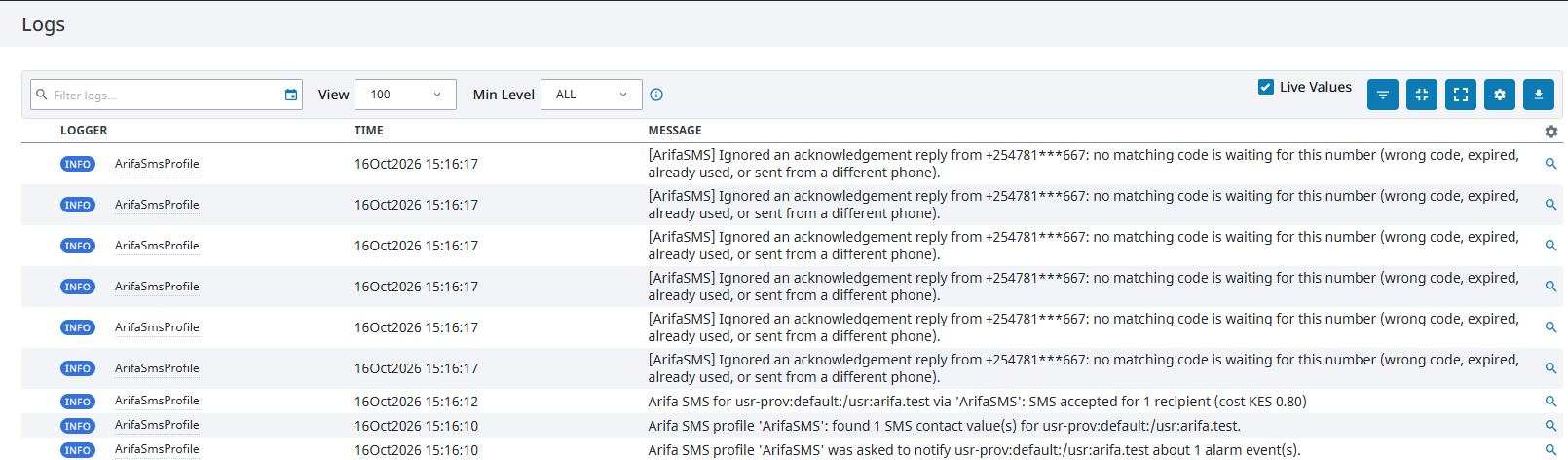
Log lines and status messages
Lines marked 8.3 only are written only by the Ignition 8.3 module.
| You see | What it means | What to do |
|---|---|---|
rejected the credentials (HTTP 401) | Africa's Talking did not accept the username and API key | Check that Username is the app's username, not its name; that the key comes from the same app and environment (sandbox or live) as the Live setting; that the key is more than about 5 minutes old; and that no space was copied with it. Type the key again: on 8.1 into both Password boxes, on 8.3 as an Embedded key. See Africa's Talking setup |
Access refused (HTTP 403) | The credentials are wrong, or a proxy or firewall is blocking the gateway | Check the credentials as above, and the network requirements |
UserInBlacklist | The person has opted out of messages from this sender, or blocked promotional messages on their line. Arifa does not retry | See opt-outs |
no matching code is waiting for this number | A reply was ignored: the code was wrong, has expired or was already used, the reply came from a different phone, or the gateway restarted after the SMS | Reply with the code from the newest SMS, from the phone it was sent to, or acknowledge in Ignition. See Acknowledge by reply |
it is not an acknowledgement reply | A reply did not read as the keyword or ACK followed by four digits, or had words after the code | Reply with only the keyword and the code. See what the operator types |
was valid but nothing was acknowledged | The reply was right, but the alarm had already been acknowledged or was no longer active | Nothing. Check the alarm in Ignition |
NOT SENT ... the limit of N SMS per hour is reached | The profile's hourly cap was reached, so this SMS was not sent | Find out why so many alarms are being sent. If the cap is too low for real alarms, raise Maximum SMS per Hour. Saving the profile clears the count |
SMS limit reached | The profile's status after the cap was reached | As above |
UNEXPECTED COST | Africa's Talking billed in a currency other than the Expected Cost Currency. On Airtel Kenya, the message may have been billed as international traffic | Check the Africa's Talking SMS log, and ask Africa's Talking before sending more. See the currency warning |
no usable SMS number | None of the user's SMS numbers could be used. A Kenyan number must be a mobile number | Correct the user's SMS contact, written as 07..., 01... or +254... |
Last send failed | The profile's status after the last real send failed. The reason follows it | Read the reason, and search the log for the line containing FAILED: at the same time |
after retry; first attempt failed: Network error trying to send SMS with Africa's Talking | The first attempt failed for a temporary reason, and the second attempt, about 2 seconds later, worked | Nothing, if it is rare. If it happens often, check the gateway's internet connection |
Network error trying to send SMS or Timed out trying to send SMS, with no accepted | Both attempts failed. The gateway could not reach Africa's Talking | Check the network requirements, and the gateway's internet connection |
THIS PROFILE IS RUNNING IN TEST MODE | Test Mode is Yes on the Notification block, so nothing was sent | Set Test Mode to No when you are ready. See Test Mode |
is not configured correctly | A profile setting cannot be used, such as a country code that is not 1 to 3 digits. The reason follows | Correct the setting and save |
was asked to notify ... about N alarm event(s) | 8.3 only. Ignition handed Arifa a notification for this user | Nothing. If this line never appears after an alarm, the alarm did not reach Arifa. See No SMS and no Arifa log line |
found N SMS contact value(s) | 8.3 only. The number of SMS contacts Arifa found for the user. 0 means the user has no SMS contact | If N is 0, give the user a contact of type SMS. See Connect to an alarm |
API key read, N characters | 8.3 only. The profile read its API key when it started. The key itself is never logged | Nothing |
API key none chosen | 8.3 only. API Key is set to None, so the profile cannot send | Choose Embedded for the API Key, type the key, and save. See where to type the API key |
API key empty | 8.3 only. Embedded is chosen, but no key was typed | Type the key in the Secret box, and save |
the API key could not be read | 8.3 only. The profile could not read its key, so notifications fail until it is fixed. Test Mode still works | Choose Embedded for the API Key, type the key again, and save |
Could not read SMS replies | Arifa could not fetch replies from Africa's Talking | Check the credentials and the network, as for sending |
No SMS and no Arifa log line
Ignition skips a user with no SMS contact, with no error, so Arifa never sees the notification. Check that every user on the roster has a contact of type SMS. See Connect to an alarm.
On Ignition 8.3, Arifa logs was asked to notify for every notification it is given. If that line does not appear after an alarm, the alarm stopped before Arifa. Check that:
- the user has a contact of type SMS;
- the user is on the roster the Notification block uses;
- the Notification block uses this profile, and the tag's alarm uses the pipeline;
- the alarm became active.
Accepted, but not received
Arifa reports that Africa's Talking accepted a message, not that it reached the phone. Check the SMS log in the Africa's Talking dashboard. With Live off, messages go to the simulator, not to phones.
Stopping SMS quickly
- Stop all real SMS at once: untick Enabled on the profile, or set Test Mode to Yes on the pipeline's Notification block.
- Go back to the free simulator: untick Live on the profile.